Live View
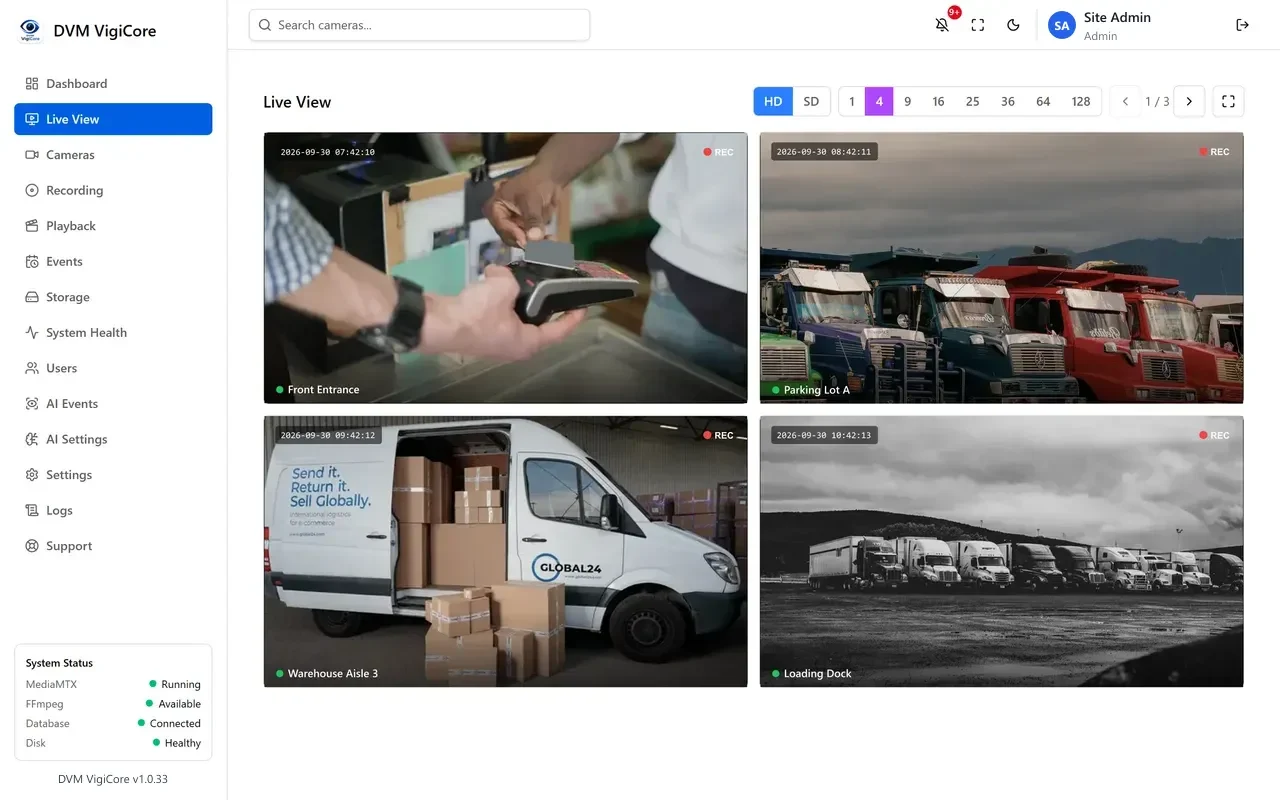
Grid layouts from 1 to 128 tiles, sub-stream (SD) switching per tile to save bandwidth, digital zoom and pan, per-camera fullscreen, and saved layouts each operator arranges for themselves.
- 1–128 tiles
- HD / SD per tile
- Saved layouts
DVM VigiCore · On-Premise NVR Software for Windows
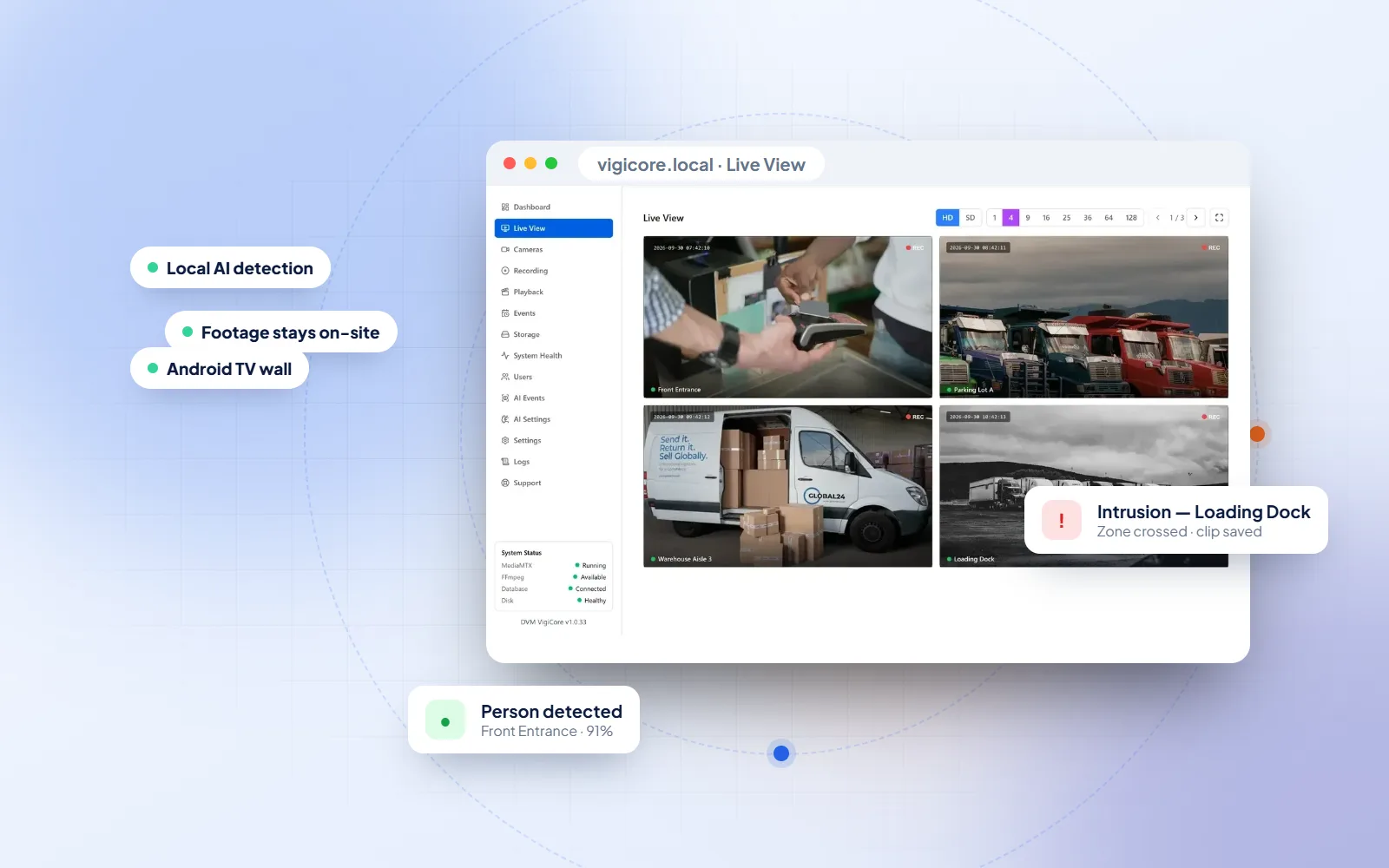
A self-hosted NVR and video management system for sites where recorded video is evidence — built-in AI detection, crash-safe continuous recording and frame-accurate incident export, on hardware you own.
Quick answer
DVM VigiCore is on-premise video management software (VMS) and network video recorder (NVR) for Windows, made by DVM Techno. It records IP cameras 24/7, runs AI detection for people, vehicles, intrusion, loitering and tampering locally, and exports incident clips losslessly — with no cloud account and no footage leaving your building.
One Windows Install
No analytics appliance, no separate storage gateway and no per-feature add-ons. One Windows installer brings up the recorder, the streaming server and the AI engine together — and every camera, recording and detection stays on your own disks.
VigiCore is built for facilities where video is evidence: warehouses, factories, schools, hospitals, retail stores and offices. Operators get a fast browser interface for live view and playback, while managers get audit logs, roles and health monitoring they can trust.
Pair it with our CCTV installation service, or run it on your existing ONVIF cameras.
Watch the demo
Live view, local AI detection, playback with lossless export and the Android TV video wall — a quick tour of the real VigiCore interface.
CH.01 · System
Live view, recording, playback, export, camera management, backup, access control and monitoring — all included, all local.
Grid layouts from 1 to 128 tiles, sub-stream (SD) switching per tile to save bandwidth, digital zoom and pan, per-camera fullscreen, and saved layouts each operator arranges for themselves.
Continuous, scheduled by weekly time window or manual per camera — overnight windows handled correctly.
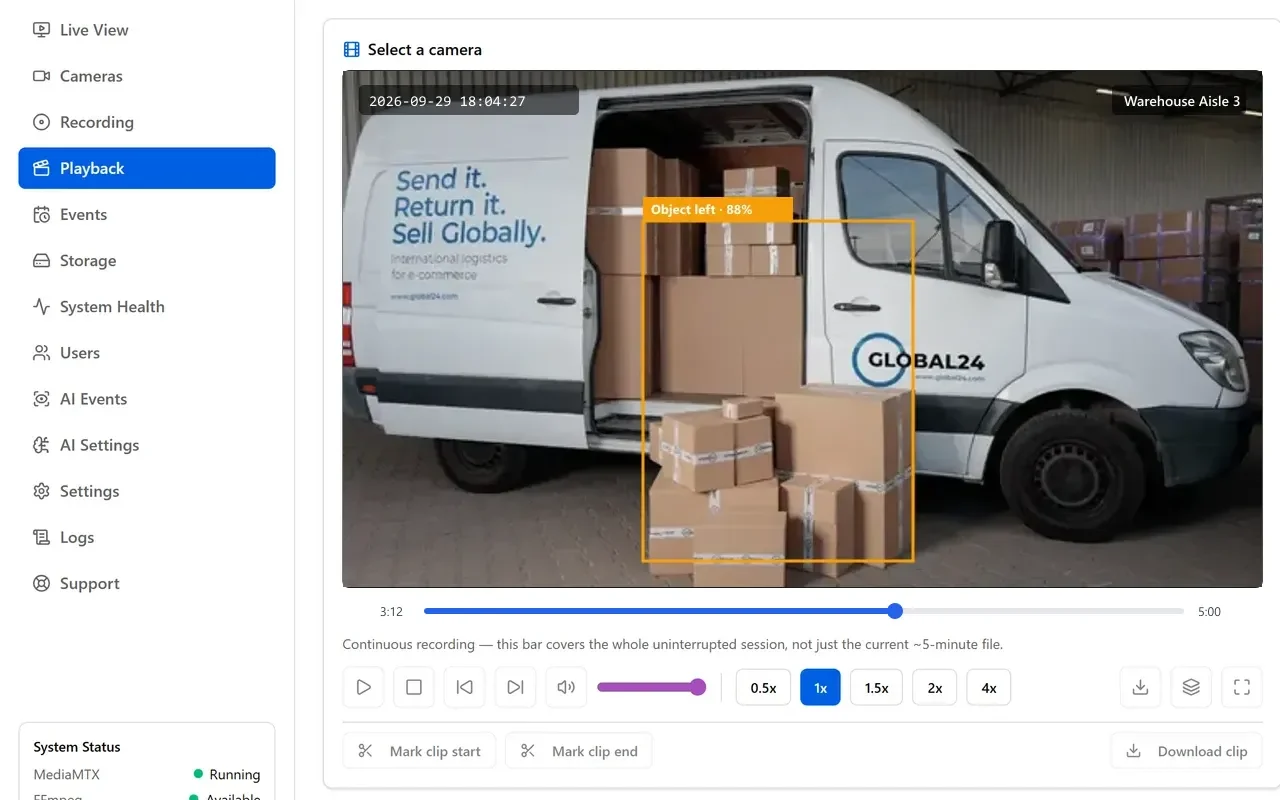
Calendar with recorded-day markers and a 24-hour timeline that scrubs across segments seamlessly.
Download a segment, a whole session or an exact clip — cut losslessly, identical to what was recorded.
ONVIF network discovery with automatic main and sub-stream detection and connection testing.
H.265/HEVC is transcoded on demand for live view — without touching the recording.
Optional replication to S3 or your NAS — Synology, QNAP, TrueNAS, WD and MinIO presets.
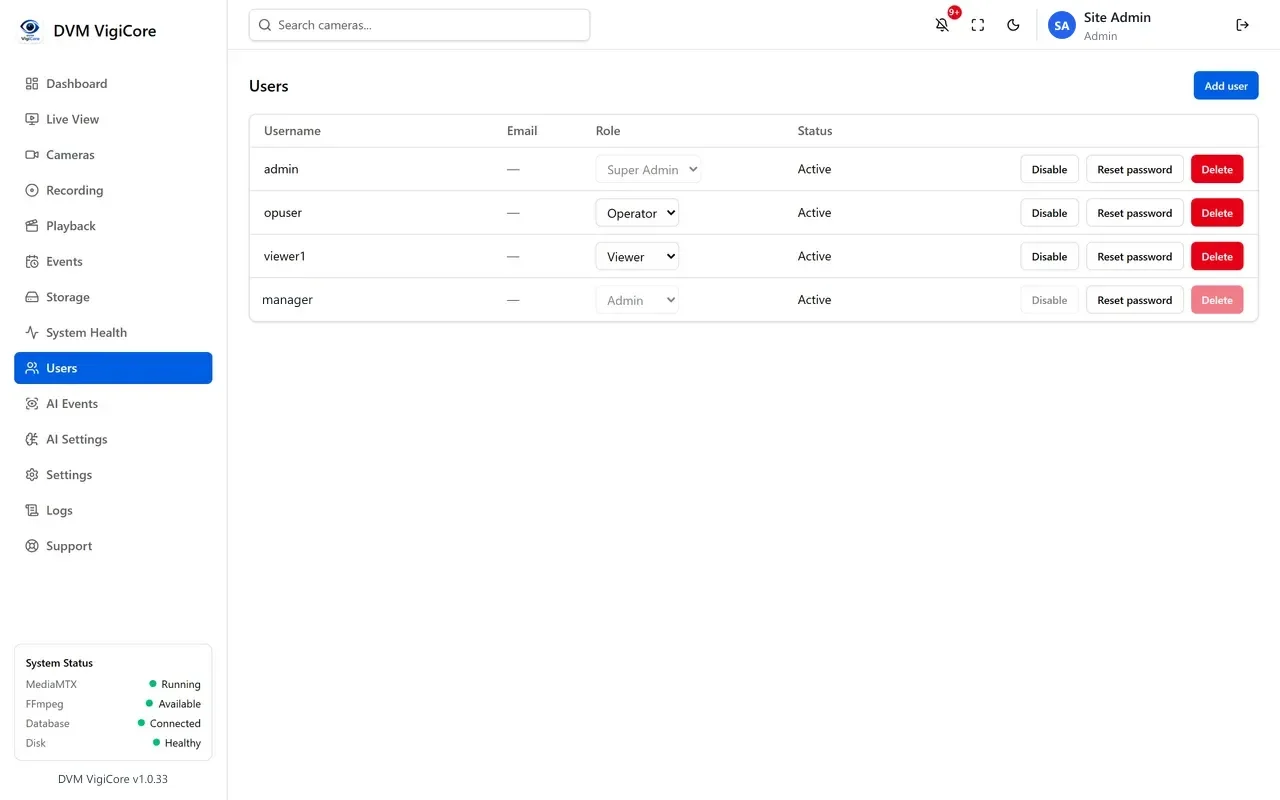
Four roles over a 12-capability permission matrix you edit yourself.
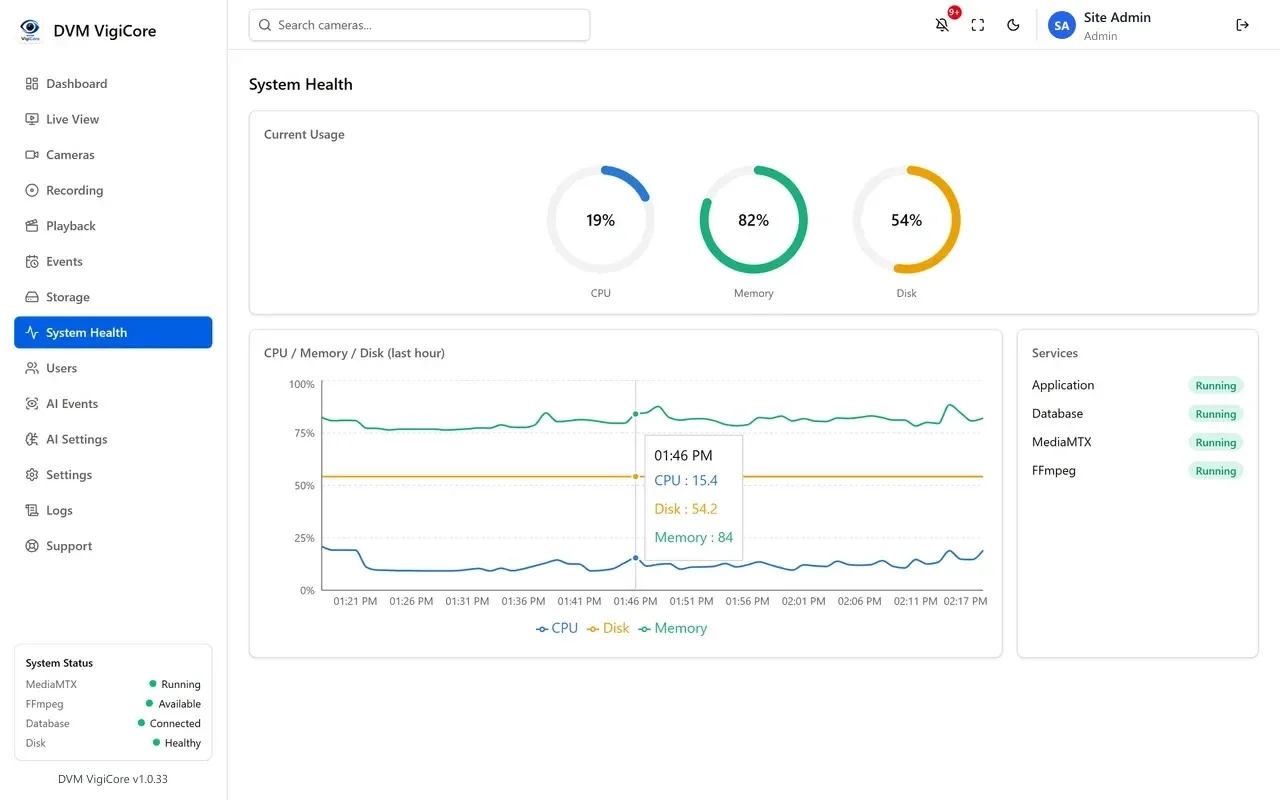
CPU, memory and disk trends, service health, audit log and a searchable log viewer.
CH.02 · Detection
A separate AI engine samples each enabled camera and runs an ONNX object-detection model locally. No frames are uploaded anywhere, and there is no third-party per-camera analytics licence.
Person, car, truck, motorcycle and animal detection with a saved snapshot per event.
Intrusion zones and direction-aware crossing lines drawn on the camera image.
Flags a person dwelling past a threshold, and bags left behind or removed.
Detects a lens blocked, defocused or redirected the moment the view changes.
Flags a person whose posture collapses and stays down — for lone-worker and care settings.
A colour and motion heuristic — an early hint alongside, never instead of, certified fire detection.
Every camera going offline or returning is logged, so coverage gaps are auditable.
Enable behaviours per camera — a car park and a corridor can run different detection sets.
CH.03 · Finding the Moment
Investigations are fast because the calendar, AI markers and lossless export work together.
Request a DemoOnly days with footage
The calendar marks which days actually hold recordings — no hunting through empty dates.
You get: The right day
AI markers on the timeline
Click an AI detection marker to jump straight to that second.
You get: The exact moment
No segment breaks
Scrub across a whole session; segment boundaries are invisible to the operator.
You get: Continuous playback
Mark in, mark out
Download one file, cut losslessly even across several segments.
You get: Evidence-grade clip
Up to four side by side
Seek four cameras to the same instant to follow a person or vehicle.
You get: The full picture
CH.04 · Reliability
Power cuts, full disks and dropped cameras are routine in the field. Each has a specific, deliberate behaviour in VigiCore.
LiveSystem status
Uptime 142 days · last power cut recovered in 38 s
CH.05 · Interface
Captured from a live installation with demo cameras — the real VigiCore interface your operators will use.
CH.06 · Android TV
VigiCore TV turns an Android TV or TV box into a view-only video wall for a guard room, reception or manager’s cabin. It signs in to your VigiCore server and shows every camera that account may view.
Built For
Wherever recorded video has to hold up as evidence, VigiCore keeps it on your own hardware and ready to export.

Loading docks, aisles and yards with intrusion zones and vehicle detection.

Shop-floor coverage, tampering alerts and fall detection for lone workers.

Counters and entrances recorded 24/7 with fast incident export.

Private, on-premise footage with fall detection for care settings.

Gates, corridors and buses — pairs with SchoolTrack bus tracking.

Role-based access and a full audit trail for compliance.
CH.07 · Editions
One installer, one engine. The licence sets how many cameras it serves and whether the AI suite is enabled — activated online, then valid offline. Without a licence, VigiCore runs free with up to 4 cameras.
8 cameras
32 cameras · most deployed
512 cameras
CH.08 · On-Premise vs Cloud
Cloud VMS platforms are simpler to start with. These are the differences that decide it where footage is evidence, or where an internet outage cannot become a recording outage.
CH.09 · Requirements
One Windows machine. No virtualisation layer, no separate database server and no Linux appliance to maintain alongside it.
Windows 10, 11 or Server 2019+, installed as local services that start with the machine.
Any ONVIF IP camera with RTSP; H.264 and H.265/HEVC supported.
Any local disk, mapped drive or UNC share — about 21 GB/day per 2 Mbps camera.
Recording is stream-copied, so CPU load is low; AI and transcoding scale with cameras.
Cameras and server on the same LAN; outbound only for licence activation.
Current Chrome, Edge or Firefox — WebRTC live view, no plugins.
Runs entirely on your LAN — no port forwarding or cloud relay is needed for recording or viewing.
A separate update installer upgrades the software and keeps recordings and settings in place.
Free Download
Install it on your own server and start recording today. VigiCore runs free with up to 4 cameras — activate a licence when you are ready to scale.
SHA-2564b5e623535f58b23c81cce0f9b549248fa39c4e083c3d07a34c72b26ceb7782f
SHA-256c9e397b7d1da1489acd8eb6e998adbd82235072d7d0a513bc2b70cc03025be15
Licence keys & support: info@dvmtechno.com
FAQs
Straight answers about recording, AI, licensing and hardware.
Yes. The Windows installer (version 1.0.33) is free to download and runs with up to 4 cameras without a licence. A licence unlocks your edition's camera count and features such as the full AI suite and off-site backup.
No. Video, AI processing and configuration all stay on your own hardware. Optional off-site backup to an S3-compatible bucket or your own NAS is available, but it is opt-in and points at storage you control.
The Live View grid supports layouts up to 128 tiles per page. Practical capacity depends on your server hardware and each camera's resolution and bitrate; licensed editions cover 8, 32 and 512 cameras.
Recordings are written as fragmented MP4 with the index at the front of the file, flushed continuously as frames arrive. An abrupt power loss costs at most the final group of frames instead of corrupting the whole segment.
Object detection (person, vehicle, motorcycle, truck, animal) using a local ONNX YOLO model, plus intrusion zones, virtual fences, line crossing, wrong direction, loitering, object left/removed, camera tampering and fall detection. Fire and smoke detection is an experimental heuristic and should complement, never replace, certified fire detection.
Yes. Mark an exact start and end point on the Playback timeline and download it as one file. The export is stitched losslessly across segment boundaries with no re-encoding, so the exported evidence is identical to what was recorded.
Any ONVIF-compatible IP camera with RTSP streaming. VigiCore can discover cameras on the network, auto-detect main and sub-stream paths over ONVIF and import or export the whole camera configuration as a file.
Nothing stops recording. An activated installation keeps full functionality for 14 days without reaching the licence server. Even unlicensed, cameras continue recording — only adding cameras and AI detection are paused.
Windows 10, Windows 11 or Windows Server, installed as local Windows services so it starts with the machine and restarts on failure. No virtualisation layer or separate server OS is required.
NVR (network video recorder) software records IP cameras to disk; a VMS (video management system) adds everything around the recordings — live-view layouts, playback search, user roles, alerts, analytics and health monitoring. DVM VigiCore is both: it records like an NVR and manages cameras, users and AI events like a VMS.
Yes, if the camera is an IP camera that supports ONVIF and RTSP — most current Hikvision, Dahua, CP Plus, Honeywell and Uniview IP models do. Analogue or HD-TVI/CVI cameras connected to a DVR are not IP cameras; they need to be replaced or connected through a DVR that offers RTSP streams.
No. Recording, live view, playback, export and AI detection all run on your local network. Internet is only used to activate a licence and, if you choose, for off-site backup or remote viewing.
Yes. VigiCore TV (version 1.2.0, Android 6.0 or newer) is a free, view-only app for Android TVs and TV boxes. It signs in to your VigiCore server, plays layouts of 1, 4, 9 or 16 live cameras, and is driven entirely with the TV remote. Download the APK from this page and install it from a USB stick, the Downloader app or adb.
Yes. DVM Techno installs IP and colour night-vision cameras and can deliver a complete system — cameras, server and VigiCore — set up and tested on site.

Tell us about your site and camera count — we will arrange a live walkthrough and size your server. Email info@dvmtechno.com.